A CRM that already knows
what your customers owe you.
No need to wire HubSpot to Calendly to Mailchimp to QuickBooks. Vuuv ships with pipeline, follow-ups, scheduling, email automation, and a public booking page built right in.
30-day free trial. No credit card required.
- Morgan ReyesKitchen remodel · follow-up ThuQuoted$8,400
- D. KimBath refresh · from booking pageNew lead$3,200
- T. AlvarezGuest bath · estimate signedWon$4,850
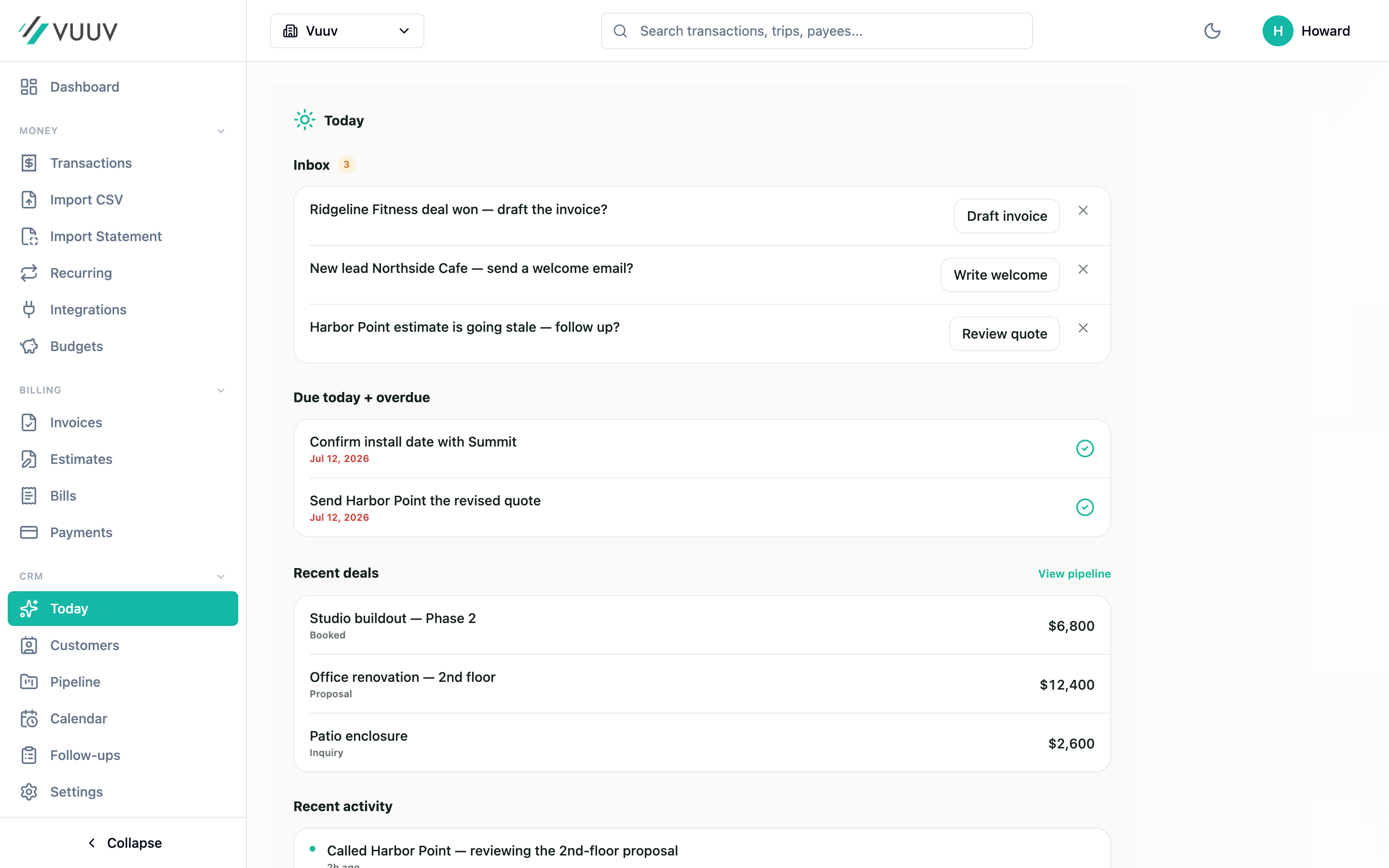
See every lead, follow-up, and deal.
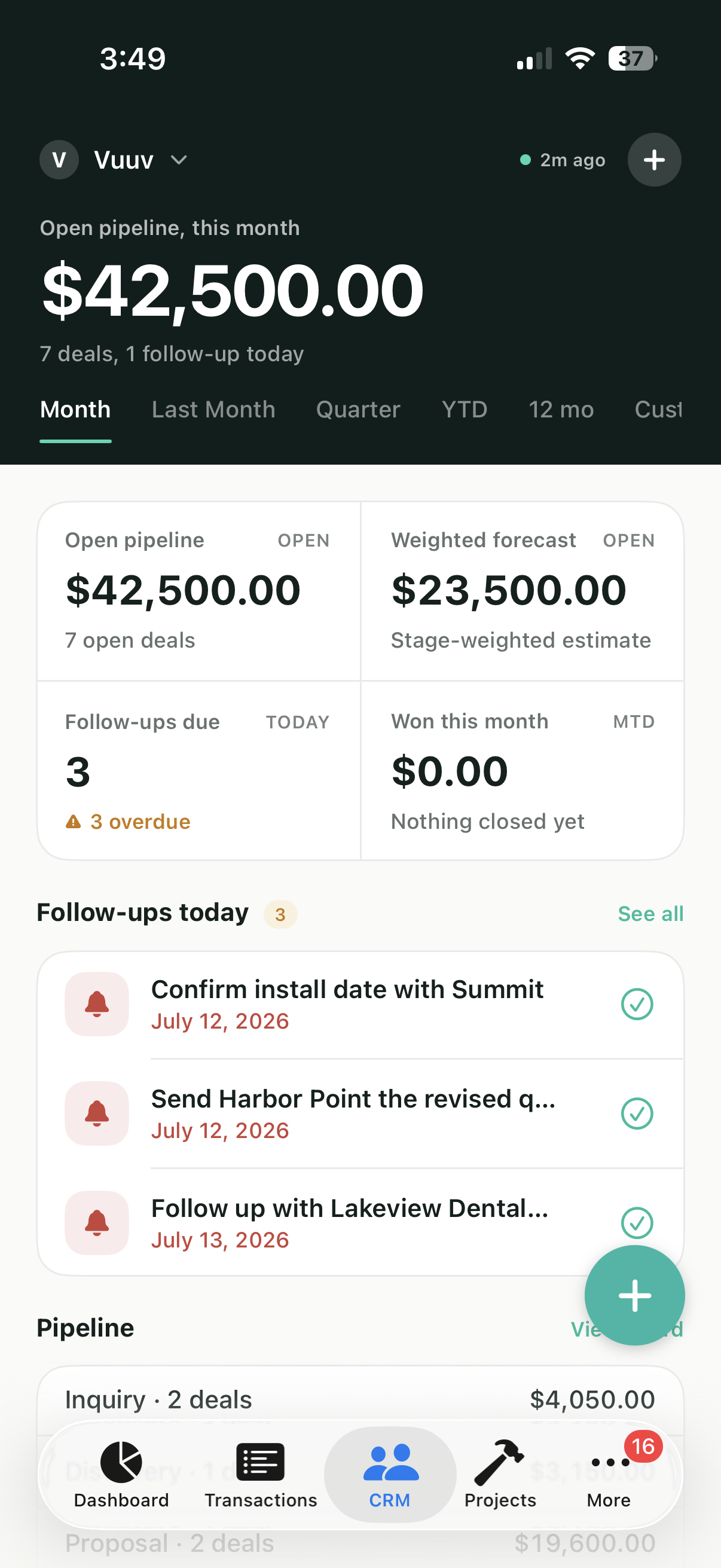
This is the actual Vuuv CRM, not a mockup. Your inbox, your pipeline, your day.
The stack most people end up with
Five subscriptions, five logins, five customer databases that don't talk to each other. Sound familiar?
A typical service business
Or just Vuuv
Built in, not bolted on
Vuuv CRM uses the same customer database as the rest of Vuuv. That changes what's possible.
One customer record
Sending a proposal pulls in the deal's contact. Marking a deal won drafts the invoice with the value pre-filled. A signed estimate auto-closes the deal. Nothing has to be re-typed.
One activity timeline
Every invoice, estimate, project, payment, call, email, and note logs to the same chronological view. The full history of the relationship, not a separate note stack.
One set of numbers
Lifetime revenue, last invoice paid, open projects, win rate, sales cycle. All live, all from the same data your books already trust.
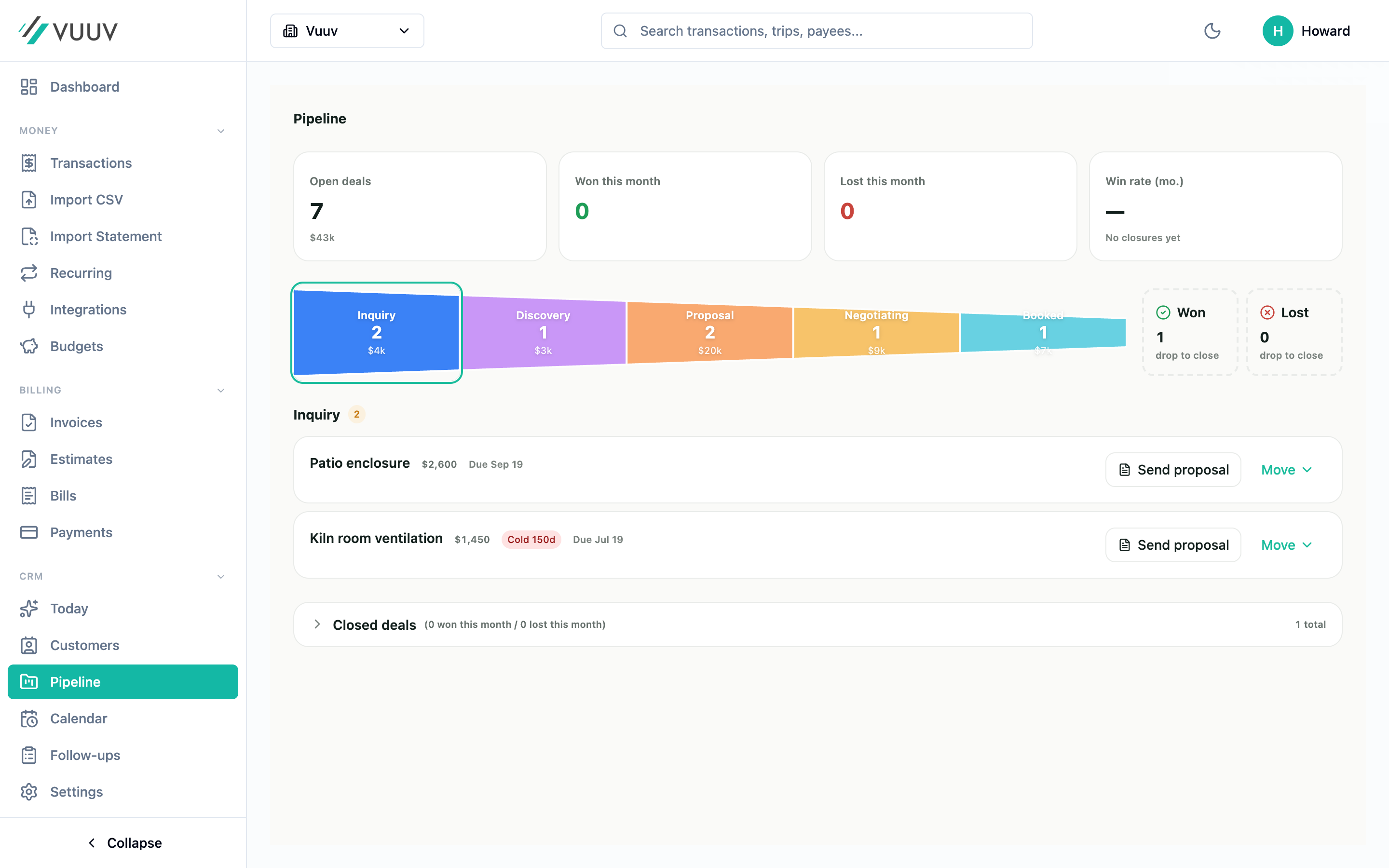
A pipeline shaped like your business
Drag and drop deals across seven stages. Pick a template that fits the way you actually sell, not the way a CRM company thinks you should.
Stage labels are yours to rename. Stage aging surfaces deals that have been sitting too long. Won and Lost capture the reason so you learn from every cycle.
- Five industry templates: Freelancer, Contractor, Coach, Creative, Small Business
- Customize stage labels per business
- Stage-aging indicators: 7-day warning, 14-day stronger, 30-day red
- Win-rate, average deal size, and cycle length tracked automatically
Sales pipeline
Contractor template · 12 active deals
4
3
3
1
1
0
Walkthrough
Johnson kitchen remodel
$42,000
12d
Quoted
Riverstone office refresh
$18,400
5d
Negotiating
Maple Ave bathroom
$11,200
3d
A timeline that logs itself
Most CRMs track calls, emails, and notes. Vuuv adds invoices, estimates, projects, payments, referrals, and reviews to the same timeline, automatically.
Walk into the next conversation knowing exactly where the relationship stands, without scrolling through six tabs.
- Invoice sent, opened, and paid events log automatically
- Estimates sent and signed appear inline with deal updates
- Projects created, milestones hit, and closeouts roll into the same view
- Manual notes, calls, and logged emails fit alongside the auto-logged events
Johnson Family · Activity
Active customer · 3 projects · $47,200 lifetime
Invoice #2049 paid in full
2 hours ago
Replied to your quote question
Yesterday
Estimate signed for guest bath
3 days ago
Project Kitchen Phase 2 marked complete
5 days ago
Review request sent
1 week ago
AI that works inside your workflow, not in a chat sidebar
No separate chat tab. AI lives where work actually happens: inside the email composer and the contact timeline.
- Welcome-email drafts for new leads, written from your business profile
- Enhancer that polishes a draft before you hit send
- Activity summarizer that condenses calls, emails, notes, and status changes into a brief
Compose welcome email
Subject
Thanks for reaching out, Morgan
Body
Hi Morgan, thanks for getting in touch about the kitchen remodel. I'd love to come take a look and walk through the scope with you. Do you have an afternoon next week that works for a 30-minute site visit?
Drafted by Vuuv AI. Edit, enhance, or send as-is.
A booking page that fills your pipeline
When someone books a call on your public page, Vuuv creates the contact and drops a deal into your pipeline automatically. No more Calendly notifications that go nowhere.
- Public scheduling URL with your branding, accent color, and logo
- Two-way Google Calendar and Outlook sync
- Availability blocks, lead time, buffer time, max future days
- Multiple event types (phone, video, in-person) on one page
- Embed snippet to drop the booking widget into any website
New booking · just now
vuuv.co/book/yourcompany
Morgan books a 30-min consult for Thursday at 2 p.m.
Vuuv creates the contact: Morgan Reyes, [email protected]
A new deal appears in your Lead column
The appointment lands on your Google Calendar
A welcome email drafts itself for your review
From URL to pipeline in 30 seconds. Without you lifting a finger.
The follow-ups you keep meaning to send, sent
Turn on the playbooks that fit your business. Vuuv handles the rest, respecting your business hours so nothing fires at 2 a.m.
Lead welcome
A warm welcome email to new leads. Compose-and-review or full auto-send.
Quote aging nudge
Polite reminder when an estimate hasn't been signed in 7 to 14 days.
Deal won kickoff
Thank-you and next-steps email the moment a deal hits Won.
Pre-project heads-up
Customer reminder three days before a project's scheduled start.
Post-project thank you
Closeout message the day after the job wraps.
Referral & review requests
After a paid invoice, ask for a referral or a review on Google or Trustpilot.
The rest of what's included
Follow-up reminders
Schedule follow-ups, get notified on your phone, see what's due today on the CRM home.
Multi-contact per company
One business can have multiple decision-makers. Deals, notes, and emails attach to the specific person.
Custom fields & lifecycle
Track contacts as Lead, Quoted, Active, Done, Repeat. Add custom fields per business.
Calendar with external sync
Month, week, or day view. Two-way sync with Google Calendar and Outlook.
Audit log
Every create, update, and delete written to an IRS-compliant audit log. Soft-delete preserves history.
iOS, Android, and web
Real-time sync across every device. Start on your phone, finish on your laptop.
One app vs. five subscriptions
The difference between Vuuv CRM and the stack most people end up with isn't features. It's that the features actually know about each other.
Less than lunch, every month
Vuuv CRM is included on Pro and Elite. No add-on, no upcharge, no per-seat CRM bill.
Pro
For growing service businesses
Then $1 a month for 3 months, and $12 a month after that.
- Full CRM: pipeline, contacts, follow-ups
- Public booking page with calendar sync
- Automation playbooks
- Vuuv AI email composer + summarizer
- Invoicing, estimates, books, and tax tools
- 1 team member
Elite
For teams running multiple businesses
- Everything in Pro
- 10 team members with scoped access
- Larger AI usage budget
- Priority support
Questions service businesses actually ask
HubSpot and Pipedrive are CRMs that ask you to integrate everything else: scheduling, email marketing, accounting. Vuuv CRM is the opposite. The accounting, invoicing, and project work already lives in the same app, so the CRM knows about every invoice sent, every payment received, and every project in flight. For a service business, that's the part that actually changes the day-to-day. For a 200-person sales team at a SaaS company, HubSpot is probably still the right fit.
No. Vuuv CRM ships with a public booking page, two-way Google Calendar and Outlook sync, multiple event types per page, and automatic contact and deal creation when a slot gets booked. The flow that takes Calendly plus a Zapier integration plus a CRM is one feature in Vuuv.
Yes. Vuuv accepts CSV imports for contacts, and you can also bulk-create contacts through the web app. Activity history imports are not yet supported, so we recommend keeping a read-only export of your old CRM for reference while Vuuv builds your new history forward.
AI usage is included with Pro and Elite, with a per-user daily limit shared across all AI features. There is no per-token charge and no separate AI subscription. For most service business owners, the limits never come up in normal use.
Pro includes one team member with scoped access. Elite includes ten. Team members can update contacts, log follow-ups, and move deals through the pipeline. You control whether they see financial fields like deal value, invoices, and lifetime revenue.
You can export contacts, deals, follow-ups, and the activity timeline to CSV at any time. Audit log entries are immutable but exportable. We're an accounting app first, so data portability is a hard requirement, not a feature flag.
Yes. Vuuv CRM ships with five industry pipeline templates: Freelancer, Contractor, Coach or Consultant, Creative, and Small Business. Stage labels are editable, so any service business can shape the pipeline to match the way it actually sells.
We use cookies. Essential cookies keep you signed in. With your permission we also use analytics, plus advertising cookies on our marketing pages. See our Privacy Policy.