Track every expense.
Catch more deductions.
Smart expense tracking with receipt scanning, automatic categorization, and IRS-ready reports. Stay organized so you can catch deductions you might otherwise miss.
Free to start. Setup takes 2 minutes.
 Payments
 Bank sync
 E-signatures
Every expense, categorized.
Your transactions land sorted into IRS categories, with Vuuv AI doing the sorting.
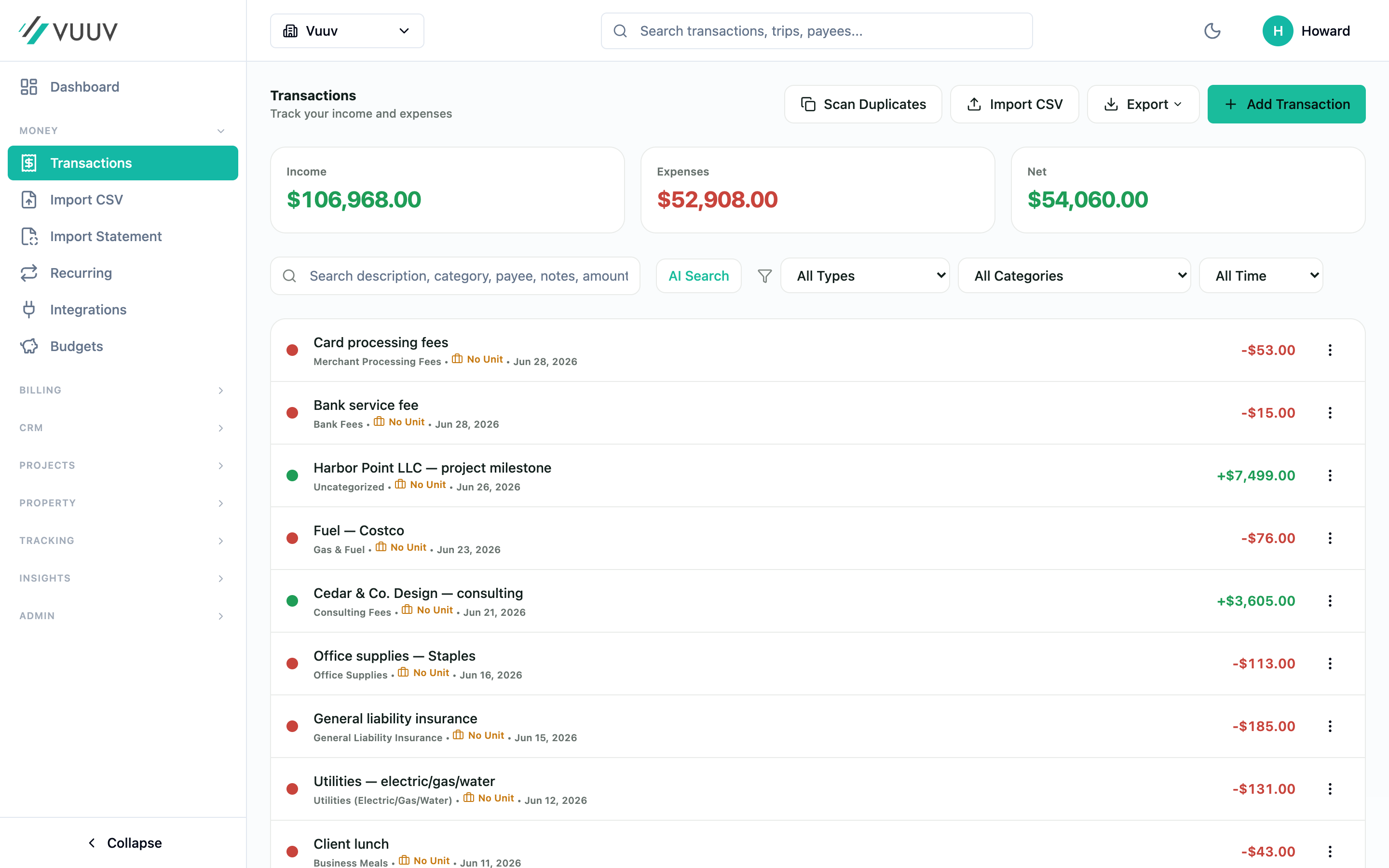
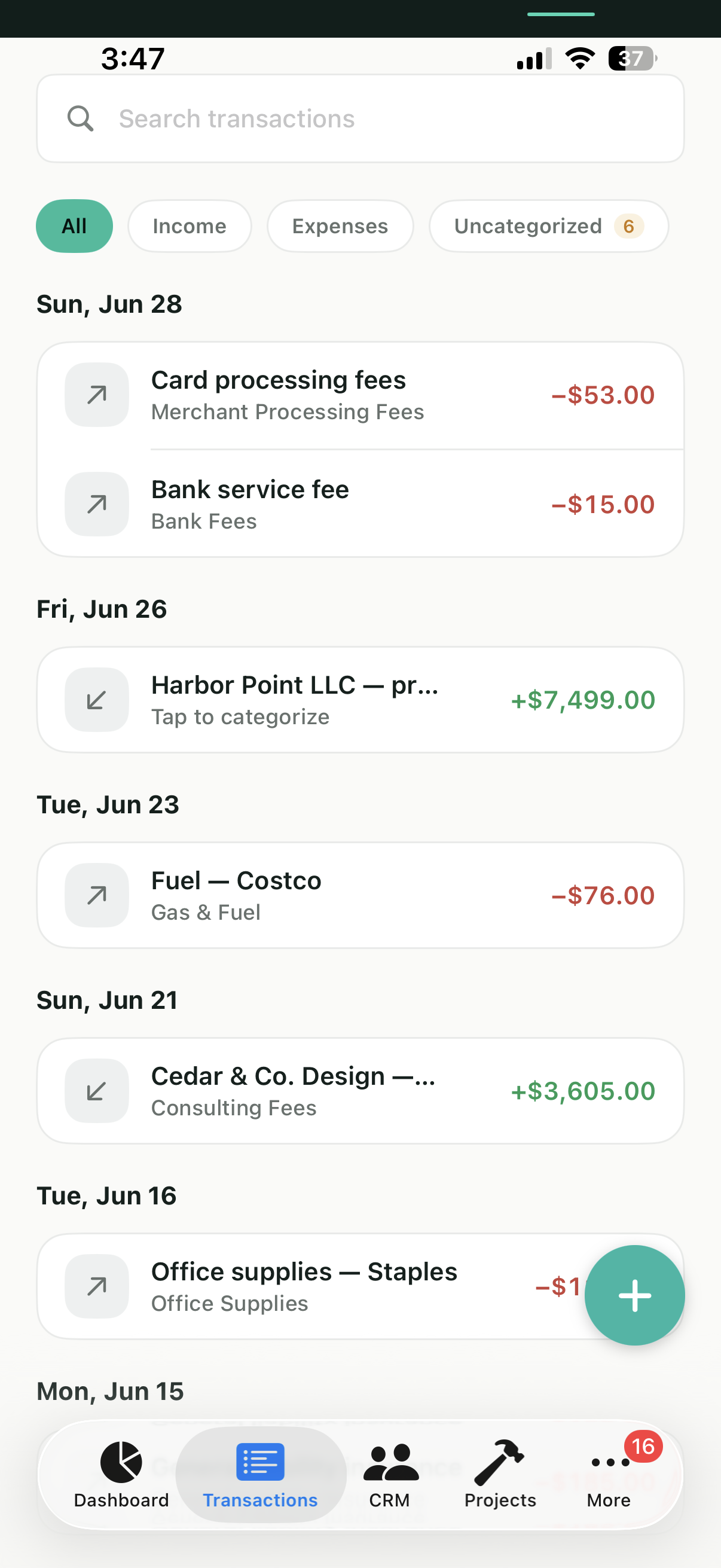
Expense tracking shouldn't be this hard
Lost receipts
That coffee-stained receipt from 3 months ago? Good luck finding it when tax season arrives.
Manual spreadsheet chaos
Spending hours entering expenses into spreadsheets, copy-pasting categories, and fixing formulas that broke.
Missed tax deductions
The IRS allows hundreds of deductions, but without proper tracking, the deductible expenses you forget to record are easy to miss at tax time.
Everything you need to track business expenses
From receipt scanning to IRS-ready reports, all in one place
Receipt scanning with AI
Snap a photo, done. Vuuv AI extracts merchant, date, amount, and line items automatically.
Smart categorization
Smart auto-categorization learns from your patterns. Tag expenses with projects, clients, or custom labels.
Bank account sync
Connect your bank and credit cards. Import transactions automatically, never manually enter another expense.
Recurring expenses
Set up recurring expenses for subscriptions, rent, utilities. Vuuv automatically tracks them each month.
Multi-business support
Managing multiple businesses or rental properties? Track expenses separately for each entity.
IRS-ready categories
Pre-loaded with IRS expense categories for sole-proprietor, rental, and corporate tax forms.
How expense tracking works in Vuuv
Three simple steps to help you catch more deductions
Add expense
Snap a receipt photo, type it manually, or import from your bank. Choose what works best for you.
Auto-categorize
Vuuv suggests the right tax category based on merchant and past patterns. Review and approve in seconds.
Generate reports
Export expense reports for your accountant, download IRS-ready tax forms, or analyze spending trends.
Common business expense deductions
It is easy to forget deductible expenses when they are scattered across receipts, cards, and bank accounts. Vuuv's IRS expense categories help you capture more of your legitimate write-offs.
- Advertising & Marketing
- Office Supplies & Equipment
- Software & Subscriptions
- Professional Services (legal, accounting)
- Business Travel & Meals
- Vehicle & Mileage
- Insurance Premiums
- Rent & Utilities
- Contract Labor & Outsourcing
- Education & Training
Illustrative example: marketing agency
Annual expenses tracked
In this example, about $17,988 in tax savings at a 30% bracket. Your results depend on your own expenses and tax situation.
AI that makes your expenses smarter
Vuuv AI works behind the scenes to save you time and catch mistakes
Smart categorization
AI learns your patterns and suggests the correct IRS category for every expense, getting smarter over time.
Duplicate detection
Imported the same transaction twice? AI scans for duplicates so you never double-count an expense.
Audit flagging
AI flags missing receipts, round-dollar amounts, and other red flags before they become IRS problems.
Why businesses choose Vuuv for expense tracking
Without Vuuv
- ✗Shoebox full of faded receipts
- ✗Hours of manual data entry
- ✗Guessing which category each expense belongs to
- ✗Deductible expenses slip through the cracks at tax time
- ✗Scrambling to recreate expense history during an audit
With Vuuv
- ✓Snap photo, receipt scanned in seconds
- ✓Auto-import from bank, zero manual entry
- ✓Suggests correct IRS category automatically
- ✓Stay organized to catch deductions you would otherwise miss
- ✓Complete audit trail with receipt images attached
Turn receipts into organized, tax-ready records
Our AI receipt scanner extracts merchant name, date, total, tax, and line items. Works with crumpled receipts, low light photos, and thermal paper that's starting to fade.
- Scan receipts from your phone
- Automatic expense categorization
- Encrypted cloud storage for every receipt
Questions about expense tracking
You can start free and enter expenses manually. Receipt scanning, automatic bank sync, and Vuuv AI categorization are part of Pro ($12/mo) and Elite, since those features cost us to run. Manual tracking and IRS categories are available on every plan.
Snap a photo in the mobile app and Vuuv AI pulls the merchant, date, total, and line items, then suggests a tax category. The receipt image is stored with the expense, so you have the documentation on hand if you ever get audited.
Yes. Connect your bank and credit cards through Plaid and transactions import automatically, so you are not entering anything by hand. AI duplicate detection watches for the same charge showing up twice so you never double-count.
Vuuv comes pre-loaded with IRS expense categories, so your expense reports line up with the forms you or your accountant actually file. It keeps you organized and tax-ready, but it isn't a substitute for advice from a tax professional.
We use cookies. Essential cookies keep you signed in. With your permission we also use analytics, plus advertising cookies on our marketing pages. See our Privacy Policy.